How does advertising on Facebook work and what does it cost?
Paid advertising on Facebook and its partner platforms takes various forms. You may see a sponsored post in the feed, directly in Messenger, in stories, while watching…
Paid advertising on Facebook and its partner platforms takes various forms. You may see a sponsored post in the feed, directly in Messenger, in stories, while watching videos, and also in so-called Reels on Instagram. In our article we will summarise how the whole thing works, when advertising is effective and, ultimately, how much it is worth investing in it.
Ads show on the basis of how and at whom you target them. So first of all, before setting up and launching an ad, it matters to know your target group (their interests, demographic data, location) and also where your target audience is (which platform, device and placements they use). You will achieve the most effective results thanks to relevant ads in the places where your target group spends most time.
Facebook and Instagram offer us various targeting options; we will talk about those in detail another time. Just sign up for our newsletter and you will always be told about new articles in good time.
Paid advertising on Facebook, like that on Google, works through an auction. The winner of the auction is the advertiser with the highest total value. This value is a combination of 3 basic factors:
The bid - the amount the advertiser is willing to pay for the ad.
Estimated action rate - an estimate of whether the ad will engage a person enough for them to take a certain action/conversion
Ad quality - ad quality takes into account how relevant it is to the user.
Where advertising on Facebook shows
When creating an ad on Facebook you first choose the goal you want to achieve. The ad can show on Facebook in several formats and in several placements. It all depends on the goal already mentioned.
Feed: You can see this type of placement in the so-called feed, that is among your friends' posts shown as you scroll Facebook, and also among posts from pages you follow.
Stories: This is advertising in stories, which is among the very popular placements. A classic story works so that you either have it in stories for 24 hours or can save it to Highlights. With advertising that does not apply and the duration is up to you. This format works well mainly within the Instagram app.
In-Stream: This kind of ad shows while watching a video on Facebook. It may be before the video starts or in the middle of it if it is longer.
Messages: This is an ad placed in Messenger, among messages from your friends. Its advantage is precisely that it looks like an ordinary message. We can target it at people who have already interacted with your brand at some point. After clicking the ad in the app, detailed information with further options appears, and so you can start chatting with prospective customers.
Marketplace: When you open Marketplace on your Facebook you can see it is a kind of bazaar where you will find plenty of different things. Besides that mass of offers from people it is at the same time advertising space, perhaps for your business too. The condition for advertising in Marketplace is that your campaign's goal must be Traffic, Conversion or Catalog sales.
Right column: It shows on the right-hand side of the screen. The advantage is that when used together with feed ads, right-column ads often achieve as much as three times the interaction rate. A drawback may be that it is visually smaller than it used to be and it is also not possible to add a call-to-action button.
Article: On Facebook it is possible to read whole articles in the Instant Articles feature. This applies only to the mobile app on this platform. The advantage is that the ad's content shows without any further click-through to another website or an external app.
Video advertising in games: This is a very motivating type of ad placement, since the user is rewarded for watching the ad to the end.
How to launch an ad on Facebook
If you want to start promoting your posts or creating ads on social media, it is essential to know there are two options.
One of them is simple but not much recommended — through the "Boost" button. It is right there next to an already published post. It does not offer many options, though, and above all this promotion cannot be evaluated in as much detail as in Business Manager.
Then there is the more professional route, which contains far more features that can target posts and ads more precisely, using an ad account. To be able to launch an ad on Facebook you need to take these 3 steps:
Set up a Facebook page – to be able to advertise and promote posts on Facebook you need to have a Facebook page. Creating it will take you only a few minutes. Be thorough when filling it in, though, so that your prospective customers can find you quickly, call you or send an email and find everything they need to know about you there.
Set up Business Manager – it is a tool where you can manage all your marketing and advertising activity on Facebook. We have covered setting it up in detail, step by step, in the article How to create a Facebook Business Manager.
Create an ad account – once you have managed to set up Business Manager, creating an ad account follows, which you create directly within it. It is nothing complicated, but do be careful to set the right currency and time zone, because those cannot be changed later.
In the ad account you can assign everyone who will be able to work with the account. On our blog we also have the article How to grant an agency access to your Facebook ad account, which will help if you have placed your trust in a marketing agency. In this account you can also add payment details, and you do that as simply as we wrote in the article.
The formats you can use when boosting posts vary. They can liven up your communication on social media, and you can even remind people of yourself with several formats, which is far more interesting than classic image posts over and over.
Static image
This post can be created with text in the creative, or with a question that can raise the interaction rate. Again it depends on what we want to achieve with the creative and which campaign we choose. With a static post the rule is that the creative needs changing more often. From our experience in Slovakia, taking the audience size into account, a creative gets stale quickly.
Video
With videos the rule is that they engage people in the feed far more than a static post. It may be a GIF, stop motion or a classic video. It should not be too long, though, and the most important things you want to say with the video should come right at the start. The reason is that fans' attention is lost very quickly.
On targeting it matters to say that with videos it is not much worth going for engagement. It has not proved itself much with our clients and it then skews the results in the metrics. Facebook counts automatic video playback into engagement, and so you are then surprised by a cost per interaction of an unbelievable €0.03, for instance — but that is not very relevant when in the end you have, say, one comment and 20 likes under the post.
Slideshow
This is an excellent format when you want to promote several photographs in one video. It can also be boosted for engagement, but here you have to be careful, as with video.
Stories
This is an ever more popular format on Facebook as well as Instagram. A large share of users spend far more time watching stories than the feed, so they should not be forgotten. If you want to engage, use a nice photo, compelling text and music in stories, or use the interactive options of polls, quizzes and other tools social media offers you.
Advertising in Messenger
You can target this type of ad for the purpose of messages, traffic or conversions. When creating it you create not only the ad but also the welcome environment users see after clicking the ad. It is worth mentioning here that you cannot target the ad at people under 18.
Collection
This format type works only on mobile devices, so that after clicking, the ad shows full screen. It shows to fans in the feed and in stories. With a collection we can discover, browse and buy products or services. It contains an opening image or video under which we can place several products. So if you have an e-shop or services, this format is worth testing.
Lead form
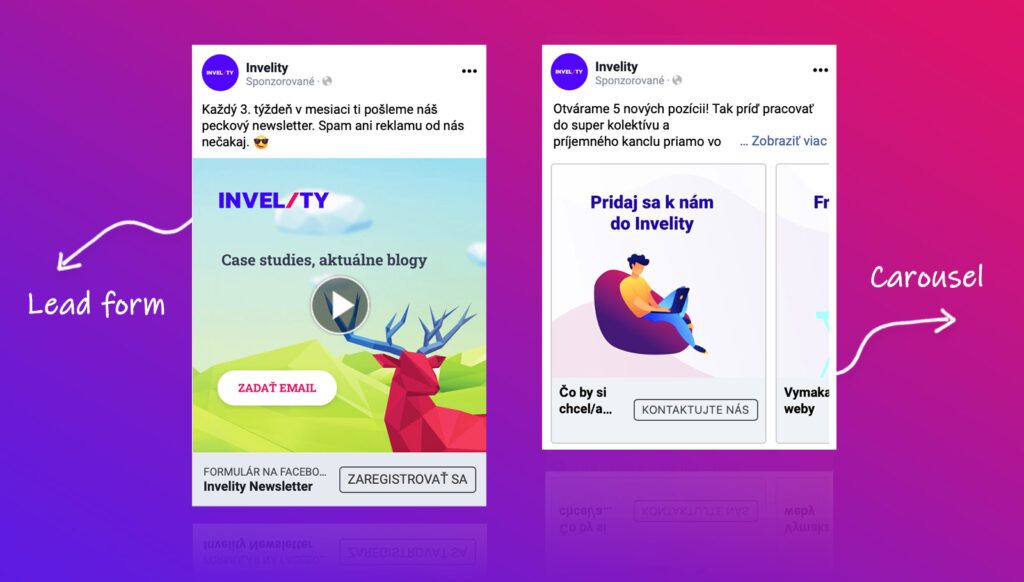
You can collect client contacts without creating a form on your own site. Ads through Lead ads have plenty of advantages. For instance: you can retarget people who clicked the ad even if they do not fill in the form. The form shown is pre-filled with information from the Facebook profile, the user does not have to wait for an external page to load, and much more.
We use Lead Ads at Invelity too. With this ad type we can recommend that you certainly put more questions in the form and so gain more data — not only name and email but supplementary questions too; that way you gain a higher rate of relevance and better results.
Carousel
A format every e-shop will appreciate, and services too. You can add several products and redirect a fan to the particular product that interests them. With the carousel it matters to say that it cannot be boosted for engagement, that is for gaining reactions — only for reach and raising awareness, but also for traffic and conversions. So again it depends on the campaign's goal.
What advertising on Facebook costs
Ad prices on FB are based on an auction system. When you launch an ad you will be charged only for the number of clicks or the number of impressions your ad won.
With Facebook the creative is the most important thing, so you need to devote as much time as possible to it and refresh it actively. It is interesting that if your audience gets "tired", changing the creative is the surest bet and at the same time the route to a lower cost per 1,000 impressions and then to cheaper clicks, conversions and reactions.
Besides that, Facebook favours posts with the greatest added value and relevance to the given brand or company. Facebook assesses all these attributes, which ultimately affect the total amount per click/reaction/1,000 people reached and the results. They are: the bid, ad quality and estimated action rate.
The minimum daily campaign budget starts from €1. Setting the budget also depends on the number of ad sets, ads, audience settings, the budget and the campaign's goal.
With Page Like campaigns, for instance, the amount with our clients averages between €0.30 and €1.20 per Like gained on a page. Of course we have campaigns and clients where the cost per new fan was €0.02. That is what we mention the whole time: the number of factors that play a big part, headed by the creative.
A few useful pieces of information
If you would like to know what to use and what will work for certain, that cannot be recommended unambiguously. The reason is simple: it always depends on the segment, the target group, the creative — which plays a truly huge part — and also on the budget and the goal you want to achieve. All these attributes genuinely matter and you need to understand them before you start advertising on Facebook.
At Invelity we are always helped by testing several creatives and targetings, after which we can say in time what works for a given target audience. You may find several tips and recommendations online that will help you, but there is never a guarantee that they will work 100% for you too.