A program for creating a logo: AI vs. a design tool
Creating a logo that genuinely captures a brand's essence can be a real challenge.

Lukrécia Chrenková
Graphic Designer
28. January 2025
9 min
BeginnerCreating a logo that genuinely captures a brand's essence can be a real challenge.
Lukrécia Chrenková
Graphic Designer
28. January 2025
9 min
BeginnerCreating a logo that genuinely captures a brand's essence can be a real challenge. If you are wondering how to create a logo that catches the eye, captures a brand's values and sets you apart from the competition, you need to settle the following questions. Is a template enough or do you need a tailor-made logo? Invest in a professional design program, or rather use simpler artificial intelligence solutions? Choosing the right tool markedly affects the result.
In this article we will look at two main approaches to creating a logo – professional design programs and AI-powered logo generators. Each option has its purpose, its pluses and minuses. Whether you are looking for full control over the design or a fast, affordable solution, we will help you choose the right tool for creating a logo that does your brand credit.
A logo is a visual symbol representing a brand's identity. In an overcrowded market it lets customers recognise a brand quickly and creates an emotional connection between it and its audience. A well-designed logo can symbolise a brand's values, mission and uniqueness, often relying on specific typography, colours and symbols.
Without a logo a company loses one of the key components of its identity and the ability to leave a lasting impression. Imagine a cake shop with no logo. You may have the best cake in town, but without a visual identity your business is easily lost in the flood of competition. Besides that you may come across as unprofessional, which puts prospective customers off so much that they will not even give your cakes a chance. A properly designed logo helps a company stand out, attract attention and imprint itself in customers' memory.
A logo is a basic building block of a brand's unified communication. It appears on every marketing material – from signage through product packaging to online platforms. It helps create a consistent visual identity customers recognise at once. Even though a logo is a small element, it carries huge weight in building trust and loyalty. For every company, including a small cake shop, it is an invaluable means of achieving success in the market.
Design programs are the basic tool for designers who want to create detailed, original logos. These programs' greatest advantage is a high degree of customisation – they allow absolute control over every element of the design. The second advantage is the possibility of quality output suitable for print and for the web. On the other hand, the common drawback is that they take time and technical skill, because working with these programs can be complicated for beginners.
Adobe Illustrator is one of the most popular tools for creating vector graphics and we use it at Invelity too. This program offers a wide range of advanced tools and features that let designers create precise, professional logos.
Advantages:
Drawbacks:
CorelDRAW is another popular tool for creating vector graphics, ideal for designing logos, promotional materials, illustrations and print artwork. CorelDRAW is a frequent choice above all among designers working in print and publishing, because it offers plenty of tools for working with text and layouts.
Advantages:
Drawbacks:
Affinity Designer is a relatively new tool on the design program market that has quickly gained popularity thanks to its affordability and performance. This program offers quality tools for working with vector and raster graphics, which makes it a flexible alternative to Adobe Illustrator.
Advantages:
Drawbacks:
Get in touch and arrange a meeting with us in Bratislava, Zvolen or even San Francisco. We will be glad to help you with your project.
AI-powered logo generators are an ideal solution for those needing a logo quickly, simply and without advanced design skills. These tools use algorithms to create proposals on the basis of your preferences such as colours, style and typography.
In the following steps we will try to create a logo for our fictional cake shop that captures the sweet, homely character of our products and at the same time comes across as professional. We will try using AI generators to find out which of them best helps us achieve the result we want.
Canva is a popular logo generator that appeals to a wide spectrum of users thanks to its simplicity and affordability. It offers an extensive library of templates, icons and visual elements, which allows fast design creation even for complete beginners. In the free version it gives basic features, but for more advanced options it may be necessary to invest in a premium plan.
Advantages:
Drawbacks:
Premium package: €110 a year or €12 a month
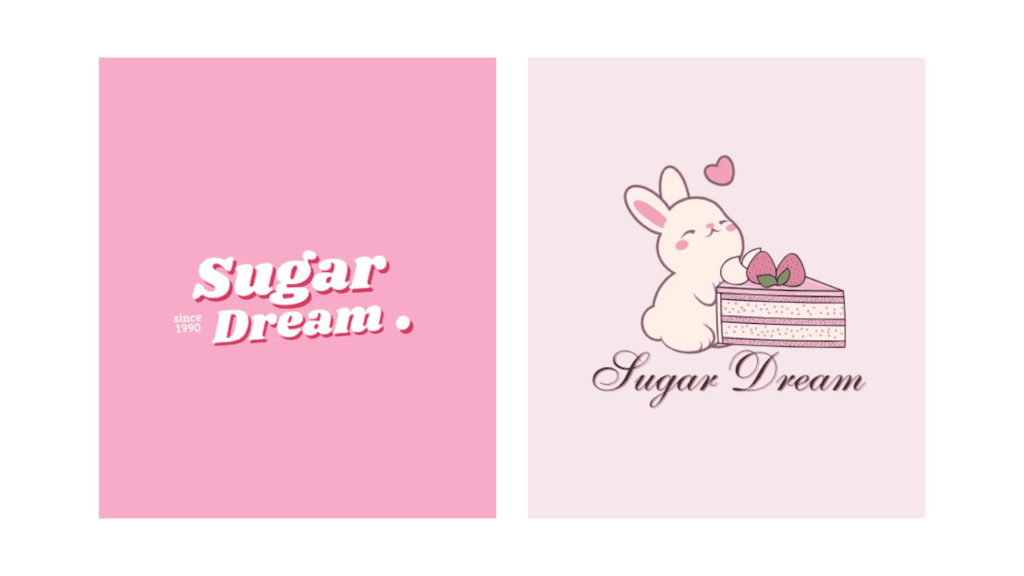
Looka is an AI tool specialising in creating logos and wider branding. It offers tailor-made proposals according to your preferences and lets you create a complete visual identity for your brand. It is ideal for those looking for a simple but professional solution for a logo and corporate design.
Advantages:
Drawbacks:
Premium package: from $20 to $129 a year, depending on the package type

Wix Logo Maker combines artificial intelligence with practicality to create a logo matching your vision exactly. This tool is perfect for businesspeople who want to integrate a logo smoothly into their Wix site. It gives flexibility to adapt the design for digital and print use alike.
Advantages:
Drawbacks:
Premium package: from €9 to €14 a month, depending on the package type

Tailor Brands offers a comprehensive solution for companies looking for more than just a logo. This tool lets you create a whole visual identity including designs for social media and a simple website. Its good-value packages are an excellent choice for start-ups needing a fast, affordable branding solution.
Advantages:
Drawbacks:
Premium package: from €2.49 to €48.99 a month, depending on the package type
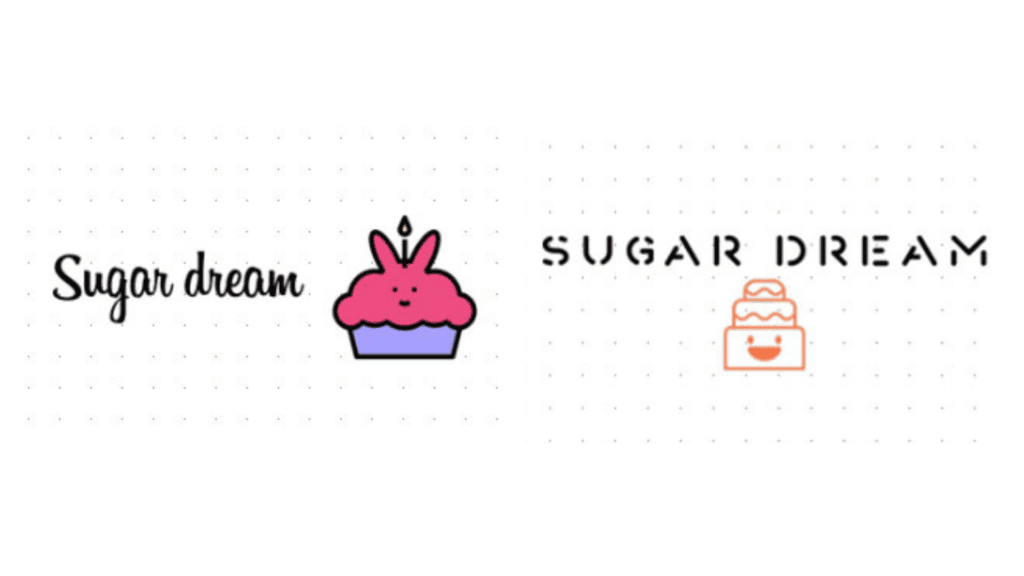
Choosing between AI logo generators and design programs depends on your needs, budget and the time you want to invest. AI generators such as Canva, Looka, Wix Logo Maker or Tailor Brands are fast and simple to use. They offer functional solutions ideal for small businesses or individuals needing a logo in a short time and without demanding design skills. Their drawback, though, can be lower originality of the designs and limited customisation options. Take a look at our comparison of the top AI tools for generating images.
Conversely, design programs such as Adobe Illustrator, CorelDRAW or Affinity Designer give more detailed control and professional tools that let you create a unique logo exactly as you imagine it. They take more time and skill and a higher investment, though, so they suit above all those looking for maximum quality and uniqueness.
The comparison in short:
Get in touch and arrange a meeting with us in Bratislava, Zvolen or even San Francisco. We will be glad to help you with your project.
Every route has its advantages, and which is best for you depends on your goals. We recommend trying various tools and finding the one that best suits your needs. And if you want a logo that will be genuinely unique and professional, do not hesitate to turn to us. We will be glad to help you create a logo that captures your brand and leaves an unforgettable impression!
Lukrécia Chrenková
Graphic Designer
The latest trends, proven practices and analyses from the digital world. Find out how to take your technology and marketing growth further.
And don't forget to check out Invelity Extras – you'll find a marketing glossary, useful tools and plugins to make your work easier!
Invelity Extras