What audiences we have on Facebook and what they are for
Facebook is the most used online social network worldwide, currently with roughly 2.96 billion monthly active users. Thanks to its large number of users…
Facebook is the most used online social network worldwide, currently with roughly 2.96 billion monthly active users. Thanks to its large number of users, Facebook is a suitable tool for promotion and is very often used in online advertising.
On Facebook there are various groups of users with various interests, characteristics and hobbies. It is precisely thanks to this diverse user base that Facebook allows ads to be targeted at various audiences. Targeting ads at a precisely defined audience can help raise CTR, bring traffic to your site, support brand awareness, or help fulfil another marketing goal.
What Facebook audiences are and what they are for
Facebook audiences are a group or list of users you want to target your ads at when advertising on Facebook. By creating audiences you can make sure the right message reaches the right users.
The point of audiences lies in creating specific groups of users you want to target a particular ad at. Thanks to this it is possible to exclude users who are not relevant to your advertising campaign and so concentrate attention and budget on the right audience.
Basic audiences on Facebook
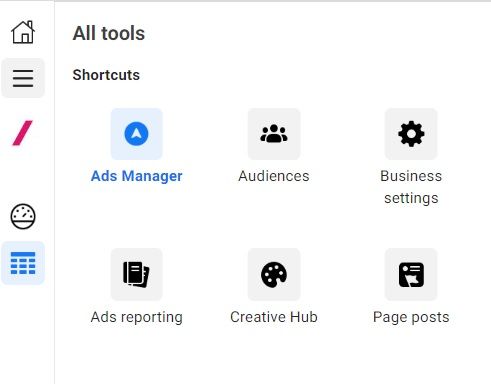
Facebook audiences are found in Business Manager in the Ads Manager section, where we can create and manage them. If you want to work with an audience, go to Business Manager and open the Ads Manager application. On the left click the 3 lines and choose the Audiences icon. After clicking, a list of all the audiences you have created will appear. In this section you can add various further audiences by clicking Create audience. You can choose Custom, Lookalike and Saved audiences.
Custom audiences
Custom audiences are based on data from offline customer lists or come from online interactions with people on a website, in an app, or on Facebook or Instagram.
The point of these audiences is that they let you connect with people who have already shown an interest in your product or business. You can create audiences from customer contacts, website activity or activity in a mobile app. In one account you can create more than 500 custom audiences. They are in fact remarketing audiences.
Lookalike audiences
Audiences made up of people who have never interacted with your company but who, according to Facebook, are similar to one of your active custom audiences. These audiences let you reach people similar to the audience you generally focus on. You can create a lookalike audience based on people who like your page, based on conversion pixels or on any of your existing custom audiences.
Lookalike Audiences are a fast, effective way of connecting with people who are very likely to respond to your ads. All you have to do is choose a source audience from users you know. Your ads will then reach other people with shared interests and characteristics.
Tips for you:
You can create up to 500 lookalike audiences from one source audience.
For a source audience to be usable for creating a lookalike audience it must contain at least 100 users from one country
Users in the source audience are excluded from the lookalike audience.
Similar to a lookalike audience is the Special Ad audience, because it uses similarities in the behaviour of users in your source audience to create a new audience. The Special Ad audience is, however, adjusted to comply with the audience selection restrictions connected with your campaign's chosen special ad category. The Special Ad Category on Facebook is a classification of ads referring to areas such as housing, credit and employment opportunities. You can learn more about the Special Ad Category here: LINK
Saved audiences
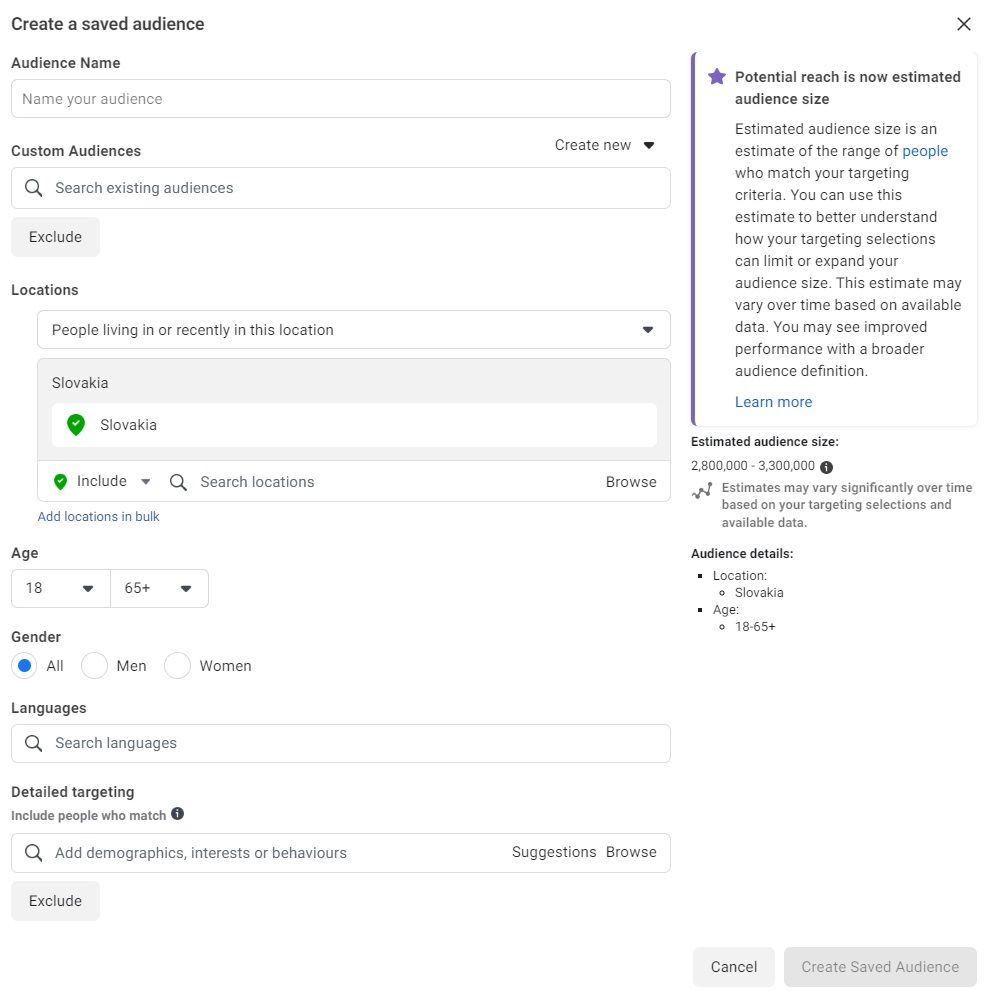
These are audiences created by including or excluding people on Facebook on the basis of shared demographic data, interests or behaviour.
When creating saved audiences you have the option to:
include or exclude a custom audience,
focus on a particular location,
choose an age range,
target by gender,
select users by language,
use detailed targeting.
Detailed targeting
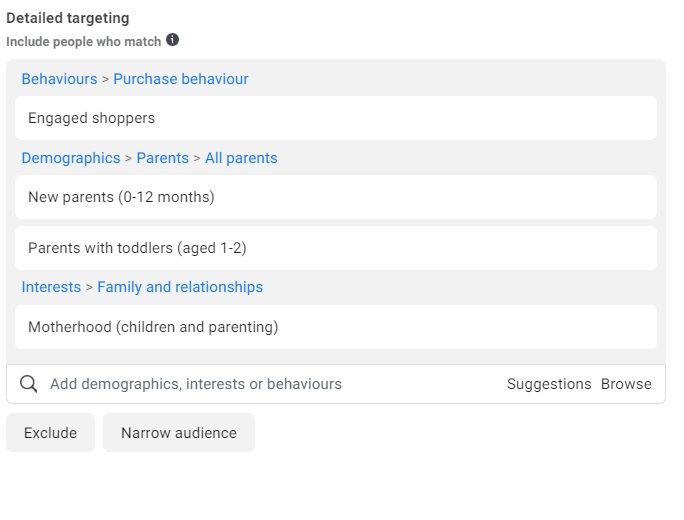
Detailed targeting lets you narrow the audience by including or excluding users through their demographic data, interests or behaviour. By selecting these factors you can adapt your audience so that it is as relevant as possible to your business and so contributes to achieving your advertising goals.
In the following example we will show how to specify this audience:
If you sell products meant for babies, you can for instance focus your ad specifically on mothers who like shopping, are interested in topics connected with motherhood and whose children are at most 2 years old.
We believe you can now picture what FB audiences are and what they are for. If you have questions or need advice, we will be glad to help :)
Recommended reading
The latest trends, proven practices and analyses from the digital world. Find out how to take your technology and marketing growth further.