Unify Facebook referrals in Google Analytics
We use various tricks to make our work more efficient and measurement simpler.

Jakub Gombár
Co-Founder
30. June 2020
3 min
AdvancedWe use various tricks to make our work more efficient and measurement simpler.
Jakub Gombár
Co-Founder
30. June 2020
3 min
AdvancedWe use various tricks to make our work more efficient and measurement simpler. You need not be a PPC guru to check your own ads' performance or review various statistics in Google Analytics. If you measure Facebook performance through Google Analytics you have certainly come across various Facebook referrals. What are they for and how can we unify them easily?
By default Google Analytics sees people arriving on your site from Facebook as a referral, meaning visits that reached your site by clicking a link on another site. In this case they are people who found your link in the Facebook app and on the Facebook website.
Traffic is measured in Google Analytics as a set of different referral sources. Here is an example of what you will find in the Acquisition – All Traffic – Source/Medium report:
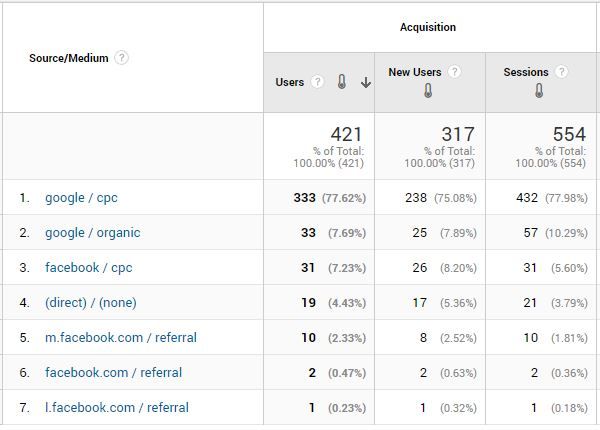
That makes things slightly harder when you want to work out the total number of people who found your site on Facebook.
The most common Facebook referrals you will find in Google Analytics reports are:
m.facebook.com
l.facebook.com
facebook.com
lm.facebook.com
But you may also find other Facebook referrals such as:
business.facebook.com
free.facebook.com
web.facebook.com
mtouch.facebook.com
mbasic.facebook.com
apps.facebook.com
mobile.facebook.com
m.latest.facebook.com
touch.facebook.com
intern.facebook.com
Facebook referrals appear for two main reasons:
Applying a view filter in Google Analytics is the best way to tidy up Facebook referrals. The filter lets you combine all the different Facebook referrals into one.
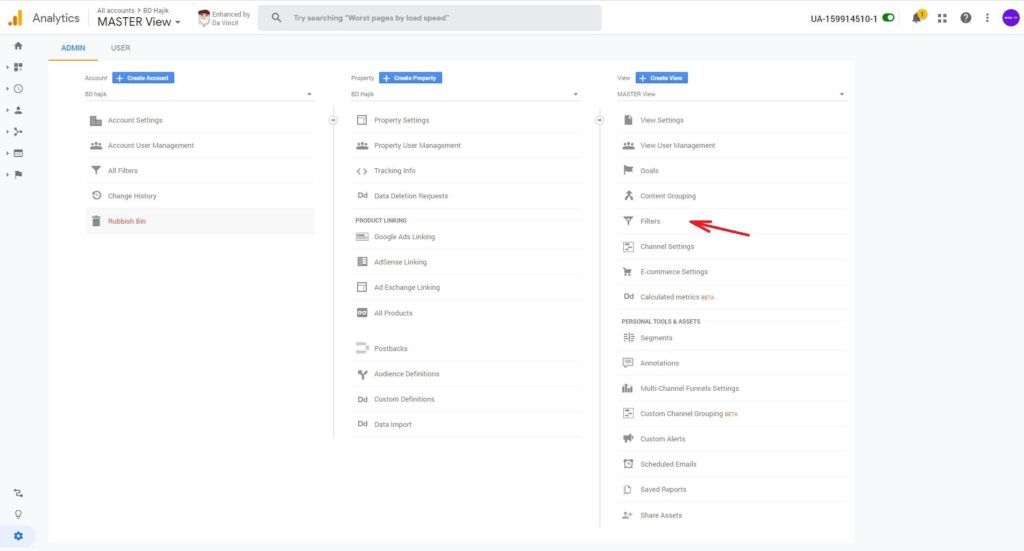
Search string: .*\.facebook\.com
Replace string: facebook.com
This filter finds any source containing the domain .facebook.com (which will cover every Facebook subdomain) and replaces it with the string "facebook.com".

All your traffic should then appear as a single Facebook referral.
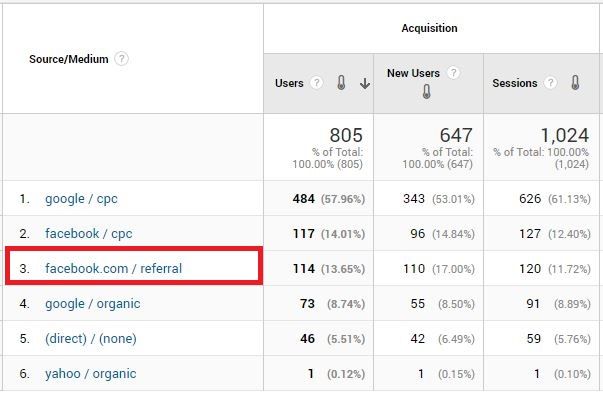
So if you want to keep Google Analytics clear and tidy, consider adding a view filter that combines all the different Facebook referrals in your reports. And if you are running paid ads on Facebook, it matters to use campaign tags — UTM tags — on every link bringing traffic to your website. That tagging lets you compare the performance of paid and organic posts and understand the return on your ads — but more on that another time.
Jakub Gombár
Co-Founder
The latest trends, proven practices and analyses from the digital world. Find out how to take your technology and marketing growth further.
And don't forget to check out Invelity Extras – you'll find a marketing glossary, useful tools and plugins to make your work easier!
Invelity Extras