Keywords are the main building block of advertising in Google Ads. They are the foundation of advertising, above all in search network campaigns. With their help you can identify and determine precisely which words and phrases you want your ads to show for. Once you have done the initial analysis of which keywords your ad will show for, the next step is to assign a match type to those words. In doing so you tell Google clearly how strictly it should stick to the given word or combination of words when a user enters a search query, or how it may interpret their wording.
At present we distinguish 3 match types:
Broad match
Phrase match
Exact match
When you define exactly in Google which match type your keyword should show in for your campaigns, you can prevent users with no interest in your product or service from clicking your ads. But we will explain that clearly with the individual match types.
Exact match
Words in exact match are entered in square brackets. Using exact match gives you the greatest control over which search queries your ads show for.The ad is shown to the user only when they enter exactly the given keyword. Of course this match type gets fewer impressions than keywords in phrase or broad match, because we cannot show for similar words that also relate to your product or service.
Example:
The phrase [marketing agency Zvolen] will therefore show you results containing close synonyms, misspellings or plurals, but in principle your ad should appear to people interested in a marketing agency in Zvolen.
Phrase match
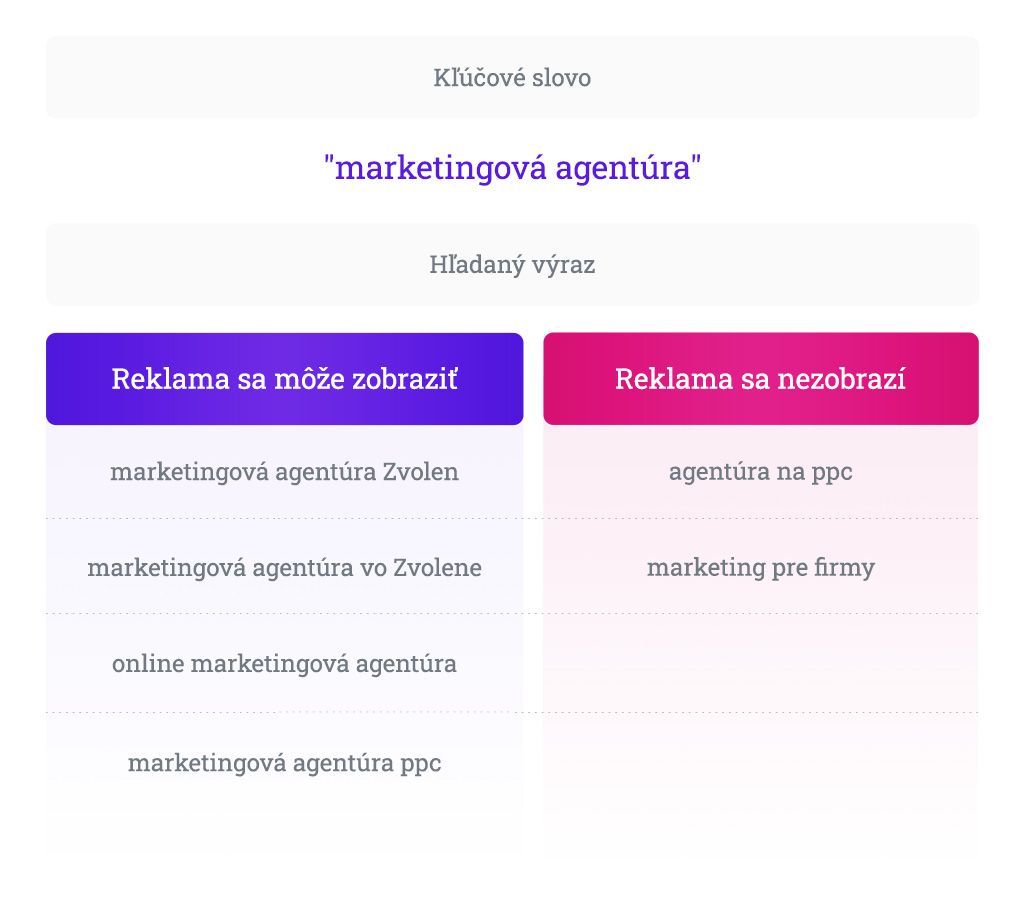
Keywords in phrase match are marked with double quotation marks. In such a case the ads show for searches related to your keywords, but they may also be close synonyms. The ad also shows if the user enters a search term containing something extra before or after your keywords, or containing a misspelling, a plural, or written without diacritics…
Example:
The phrase "marketing agency" can be used to illustrate this again. This keyword will show for the search query marketing agency Zvolen, but also for online marketing agency. And likewise for marketing company.
Broad match
By entering a keyword in broad match you tell Google that your ads may show for a search query containing words at least similar to your keyword. The aim of broad match is to bring more visitors to your site. It captures terms such as synonyms. Broad match is not defined by any symbols, which is why it is the default match type for all keywords. That means if you do not add a keyword in quotation marks or square brackets, you are automatically adding it in broad match.
Generally, broad match is used mainly in accounts with more data (so it is not recommended at the start, in brand new accounts), a bigger budget, and in campaigns with automated strategies.
With broad match we have the least control over where the ad shows, which is why it matters to watch the search queries — that is, what the user entered into search before clicking your ad. It is then necessary to exclude irrelevant words and phrases so as to avoid irrelevant clicks on the ads.
Example:
To give an example too, let us work with the phrase marketing agency. With broad match the ad for this phrase can show even when someone types, say, marketing agency Zvolen into search, or when someone types how to start with marketing.
In closing we would like to recommend generally that you watch the search queries for every match type. There are several reasons for this. They can serve as inspiration and suggest which word or phrase is relevant to your business but was forgotten when creating the campaign. It also matters to watch whether your ad is showing for search queries that are irrelevant to you, and should that happen, such words need to be excluded by adding them as negative keywords.
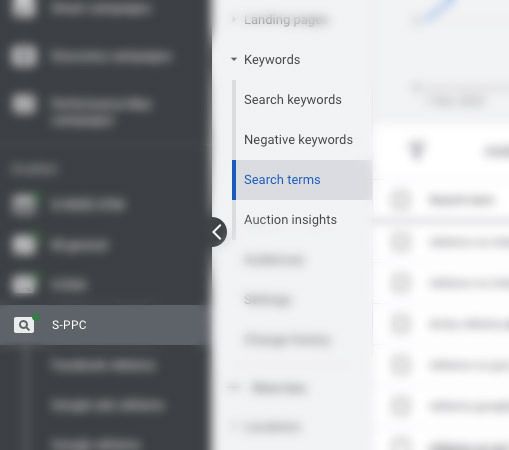
If you want to check the search queries, simply click a particular search campaign or ad group, open the keywords and then click search terms.
After reading this article the individual match types may be a little clearer to you. I hope this article helped with that. You can put the knowledge you have gained to use when setting up your search campaigns, but should you have any questions, do not hesitate to get in touch.
Recommended reading
The latest trends, proven practices and analyses from the digital world. Find out how to take your technology and marketing growth further.