
Timea Šuhajdová
SEO Specialist
Google Search Console is an indispensable tool for every website owner. This free Google service gives you a detailed view of how Google "sees" and interprets your site. It provides error reports that help explain any problems Google runs into while crawling your pages. If you are a site owner and do not use this tool, you should certainly start.
We will show in a few steps how easily an agency can be given access to this useful helper. :)
In the Search Console menu on the left, click the cog icon labelled "Settings".
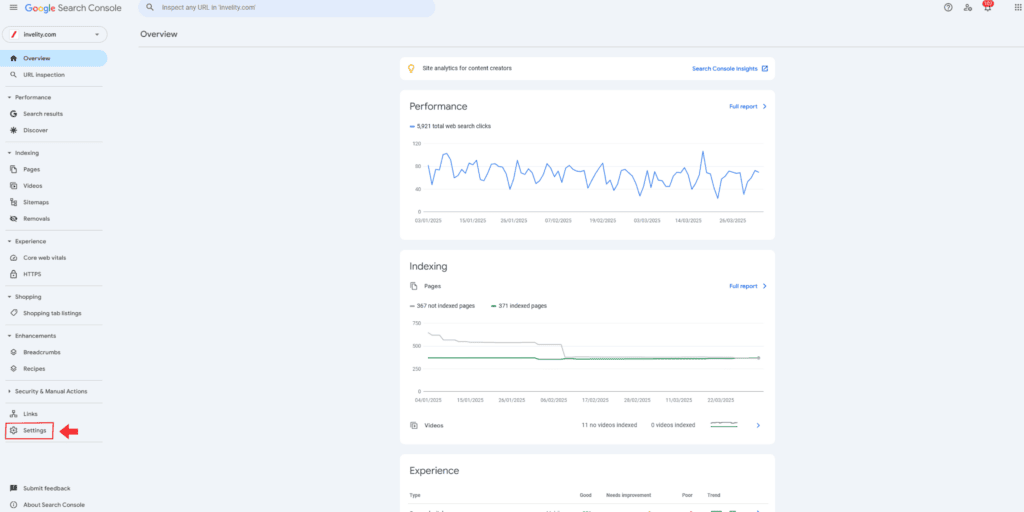
In the menu choose the "Users and permissions" section. Clicking it shows an overview of every user with access to the account, yourself as owner included. In this overview you can manage their access rights.

To add the agency, click the "Add user" button.

Enter the agency's email address in the relevant field and choose its access level. We recommend granting the agency "Full permissions". Then click the "Add" button.
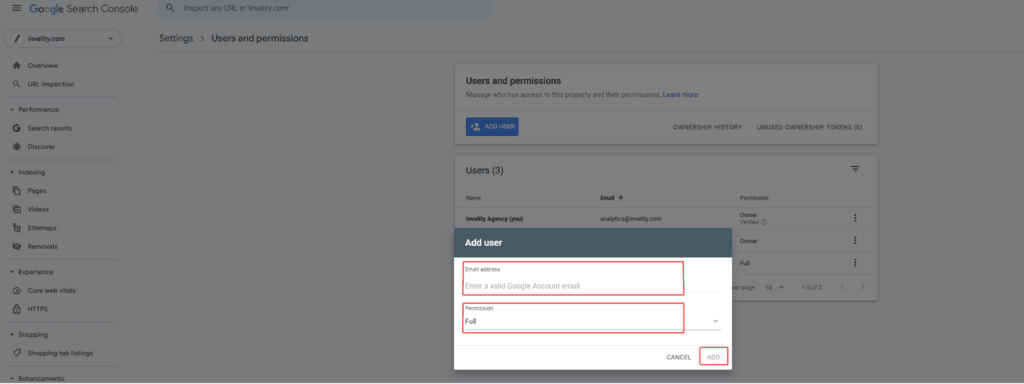
Adding an agency to Search Console is a matter of a few simple steps. As the account owner you can manage every user's access just as easily — adding them, changing their permissions or removing them altogether.

Timea Šuhajdová
SEO Specialist
The latest trends, proven practices and analyses from the digital world. Find out how to take your technology and marketing growth further.
And don't forget to check out Invelity Extras – you'll find a marketing glossary, useful tools and plugins to make your work easier!
Invelity Extras


