Managing the referral exclusion list in Google Analytics is quite hard going. Especially with an e-shop, where the number is very high, because it includes the various payment gateways you have to exclude. Managing that list is far from ideal to work with in the first place, since in Google Analytics we cannot easily copy and edit these referrals.
In this post I will show you how to set up referral exclusion through Google Tag Manager. In my view it is simpler this way, because the code can be copied. If you manage or own several e-shops, you simply copy it across and need not worry about referrals showing up in Google Analytics. We need to exclude a number of referrals, or referral sources, to prevent sessions from being split. Let us be clear about one thing at the outset. Excluding these referrals does not mean we are blocking them. It means that all traffic coming from the link is converted to "direct/none" in the source/medium view. It follows that referral exclusion should not be used to "fight" referral spam.
Now that we have that clear, let us get to the solution. To set this feature up so that it works, you have to create a new custom JavaScript variable. Give it a good name, such as {{JS – Exclude Referrals}}. Copy the following code into it:
function() {
  var referrals = [
    'referrer1.com',
    'referrer2.com',
    'referrer3.com',
    'referrer4.com'
  ];
  var hname = new RegExp('https?://([^/:]+)').exec({{Referrer}});
  if (hname) {
    for (var i = referrals.length; i--;) {
      if (new RegExp(referrals[i] + '$').test(hname[1])) {
        return null;
      }
    }
  }
  return {{Referrer}};
}
The only thing you now have to change are the referrals. Every referral you want to exclude must be on its own new line, in quotation marks, and every line must end with a comma, except the last one.
The referral list is written as a regular expression. The regular expression is open on the left and closed on the right, which means an entry such as invelity.co will match the following:
- invelity.co
- www.invelity.co
- super.skvele.invelity.com
But not these:
- invelity.com
- www.invelity.com
- www.gooogle.fi
If you know your way around regular expressions, do use them. For instance, if you want to exclude only invelity.com but not blog.invelity.com, you would write it like this:
var referrals = [
 '^invelity.com'
];
The "$" that closes the expression at the end is added automatically to every line in the script. The script therefore checks every entry you have added to the referral list. It means that any GA tag using this variable will not send referral information.
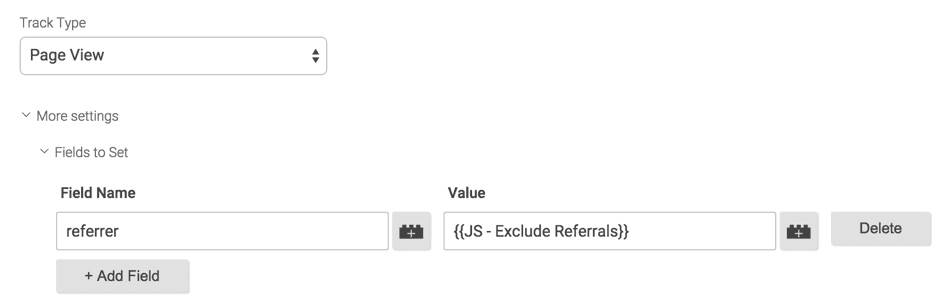
To add this field to the Google Analytics tag, go to "More Settings -> Fields to set" and add the following details:
Field Name: referrer
Value: {{JS - Exclude Referrals}}
A closing note. Try this at your own risk. Do remember to test this solution thoroughly before implementing it in full. Referral information is crucial in Google Analytics.